 Are you trying to get rid of malware on your WordPress website take a look at our checklist below. We suggest that you hire a professional website malware removal service to take care of this for you. So what do you do when you have been hacked? Many people have a wordpress site hacked redirect problem.
This check list is really for people that still have access to their websites. If your hosting company has shut down your website then you will probably need to hire someone to fix that for you. You can click here to take a look at our packages for malware removal.
Step 1. Download a fresh copy of WordPress from https://wordpress.org/download/
Step 2: You will download a zip file. Extract all of those files to your desktop and leave them for now.
Step 3: Login to your hosting Cpanel or FTP account and it should look something like this:
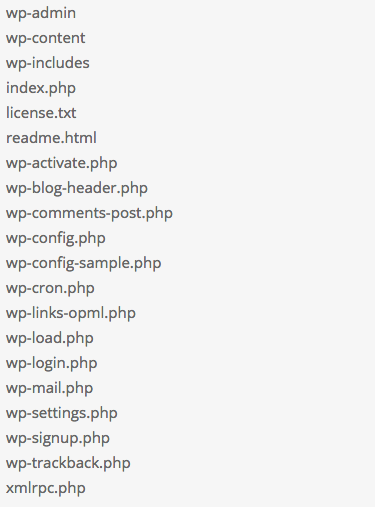
Everything should be deleted except the wp-content folder, and the wp-config.php file.
So now it should look something like this:
wp-content
wp-config.php
Now go into the wp-content folder then plugins. Write down a list of the plugins you are currently using. Now remove the plugins folder and the index.php file. After everything is clean you will need to reinstall your plugins from fresh downloads. Go into the themes folder and delete any theme that you are not using. Then you will need to check every file in your current theme folder for malware. If you have a fresh backup of your theme then you can delete the entire themes folder.
Now you need to check your uploads folder. There should be no .php files or anything like that in your uploads folder. You should recognize things you have uploaded to your site anything else should be deleted.
Step 4: Now you need to re upload WordPress.
Now you can reupload your fresh WordPress files from your desktop that you downloaded earlier. Its much easier to upload these files Via FTP. Make sure you don’t reupload the content folder it will rewrite what you currently have there.
Step 5: Your WordPress site should now be visible and clean. Now you can reinstall plugins and your theme if you deleted the entire theme.
Step 6: Make sure you change all of your passwords and make sure they are secure.
If you need help with malware removal click here to take a look at our packages. We do this everyday and we know exactly what we are doing. We offer a 100% guaranteed service. If you have questions please click here to visit the contact us page.
Check Out Our Packages

Read Our Reviews From Clients!